 Path
November 2026
Stripe or Mollie payment failing with no error: 7 causes to check on WooCommerce
The customer clicks Pay and nothing happens. No error, no email. Seven causes to check on a WooCommerce shop, in order, before the client calls.
A WooCommerce shop can show its products, fill its cart and answer 200 everywhere while nobody can pay any more. The payment provider, Stripe or Mollie, is working. The fault sits in between: a script that no longer loads, a cached page, a notification that never arrives. Nobody gets an error. The agency’s client just sees sales drop.
The seven causes, from the most common to the most discreet
- A plugin conflict after an update: a JavaScript error blocks the payment button, and the page just sits there.
- An optimisation plugin that defers or bundles the provider’s script: the card fields no longer show.
- The checkout page served from a cache: the security token has expired, and the order is rejected with no clear explanation.
- No payment method offered: a country, currency or amount rule hides them all for some visitors.
- Test API keys left in production, or keys replaced at the provider without updating the shop.
- A firewall or security rule that blocks the calls between the shop and the provider.
- The payment notification (webhook) that no longer arrives: the customer has paid, the order stays “pending”.
The method to settle it in a quarter of an hour
- Walk the journey again in a private window with the browser console open: a red error on click points to causes 1 and 2.
- Look at the provider’s log: no attempt recorded means the fault is before it, in the shop.
- A payment present at the provider with no paid order in WooCommerce points to the notification, cause 7.
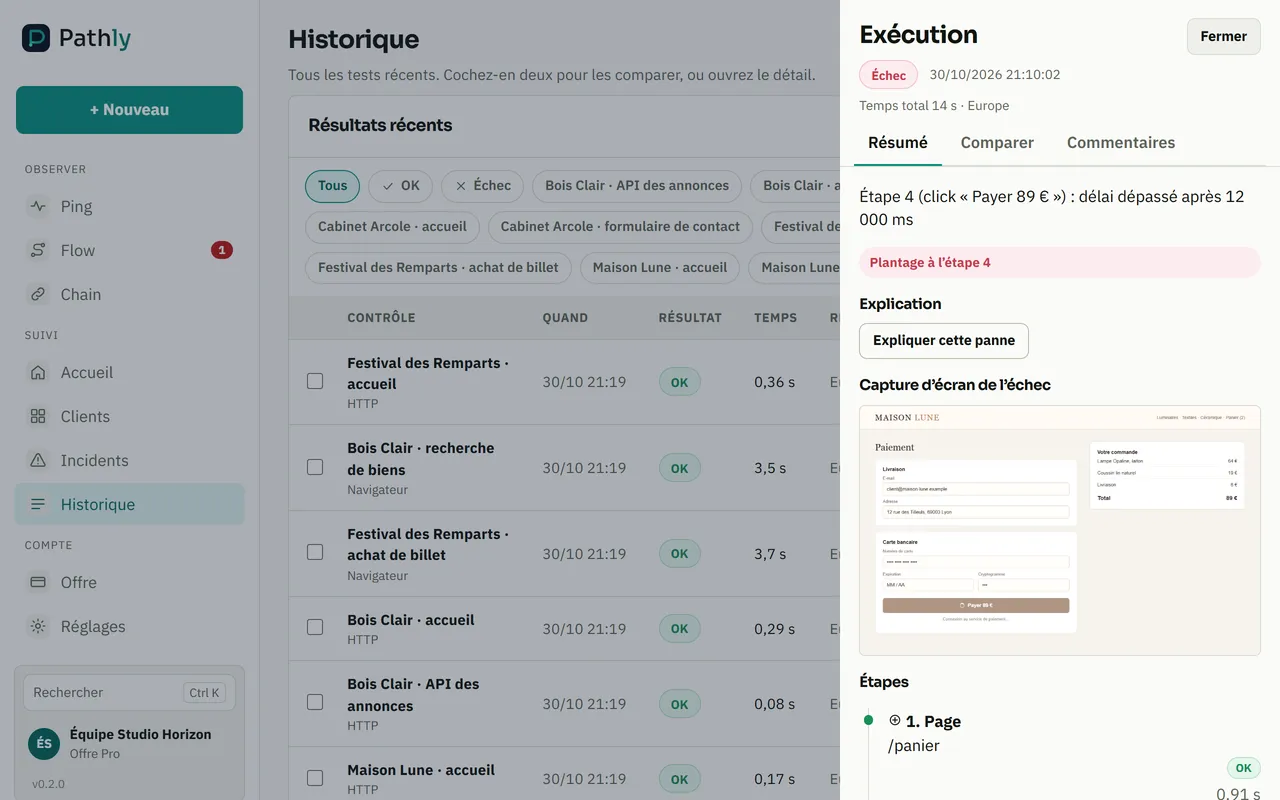
What Flow sees, and what it does not
Flow walks the journey in a real browser, from the product to the payment page, at your plan’s frequency. It checks that the cart has a total and that the payment page shows. Causes 1 to 4, and often 6, break one of those steps: the alert goes out with a screenshot. Flow pays nothing. API keys and the payment notification are therefore still checked with a test order, after each change.
- Why does the customer see no error message?
- Because nothing crashes on the server. A blocked script or a dead button produces no visible error: the page simply stays put.
- Can an uptime tool detect this kind of failure?
- No. A Ping checks that the page answers. Here it does. The journey has to be replayed like a visitor would: that is what Flow is for.
- Does Flow make a real payment?
- No. It stops at the payment page. It pays nothing and only enters test values.